Owner Driver markOwner Driver Coming to the App Store
The stress-free way for UK couriers to meet the new 2026 Making Tax Digital rules

You do your work. We’ll prepare your accounts.

Upload your manifest in the morning. Drive your route. Upload the statement when you’re paid. Owner Driver turns all of it into MTD-ready records and sends those confirmed records to your accounting software.

See how it works
£14.99 a month — launch price · iPhone · Coming to the App Store
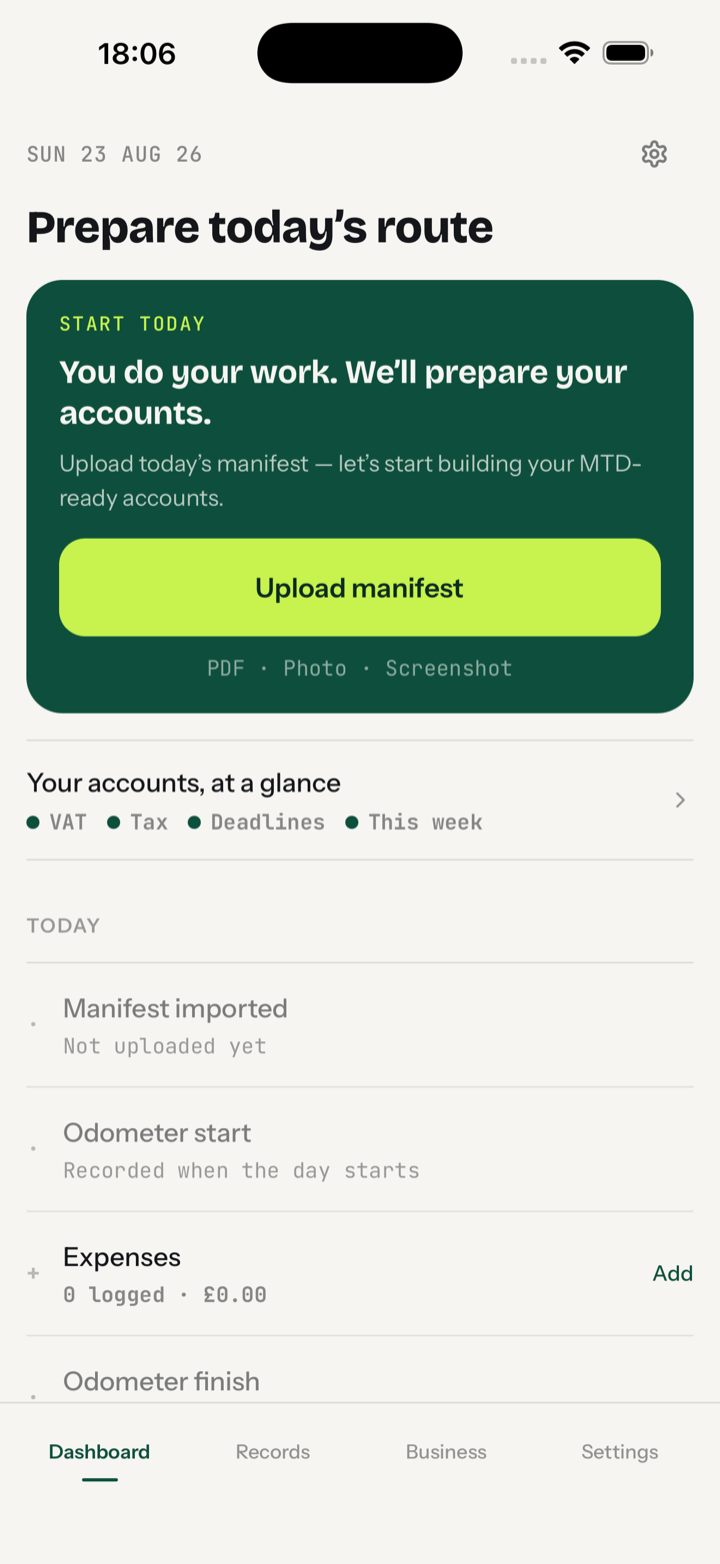
Owner Driver Dashboard: prepare today's route, upload manifest, accounts at a glance

Scanning a receipt was never the hard part.

Most courier apps can scan a receipt and track mileage. What they can’t do is follow through into finished, MTD-ready accounts. Owner Driver can, because it was built by a courier who knows how a shift actually runs. Everything gets captured during the workday with minimal fuss, saved automatically, and held ready to check against your statement. No more Sunday nights at the kitchen table. No more guessing where you stand with your tax and VAT.

Making Tax Digital is live. Your quarter is already ticking.

Making Tax Digital for Income Tax started on 6 April 2026 for self-employed income over £50,000. From April 2027 it’s over £30,000, with over £20,000 planned from April 2028. A full-time courier is either in it now or will be within two years.
It’s four deadlines a year now, not one. Digital records, totalled and sent every quarter through HMRC-recognised software: 7 August, 7 November, 7 February, 7 May. A quarter with no work still has to be sent. The first deadline has already been and gone.
Miss a deadline and you collect penalty points. Enough points turns into £200 fines. HMRC is going easy on quarterly slips in this first year. From April 2027 they count.
HMRC wants digital records kept as you earn, not typed up in January. That’s what Owner Driver does. Your manifest, your odometer readings, your receipts and your statements are recorded on the day you get them, with the proof attached.
Turnover for MTD is the gross figure, before your network takes off van hire, fuel cards or fees. A bank feed only ever sees the net. Owner Driver records the gross from your statement and shows every deduction separately.
Mileage is 55p a mile for the first 10,000 business miles, then 25p. Or actual costs. One method per van once you start, and Owner Driver keeps you on the right side of that.
So when a quarter closes, the totals are already there. Reviewed, evidenced, in the right boxes, ready for your accounting software to send.
Owner Driver keeps your records and prepares them. It doesn’t give tax advice or file with HMRC; that still happens in your accounting software.

Drive the route. Skip the paperwork.

32 seconds of the real app. A manifest goes in, a recorded workday comes out. No sound needed.

  • 0:00The manifest, straight from WhatsApp
  • 0:03Route details fill themselves in
  • 0:06Odometer in — Start Day, phone away
  • 0:15Finish Day: one reading, one confirm
  • 0:21Workday saved — that’s the whole job
  • 0:25Records: matched, evidenced, up to date
Watch the full walkthrough (2½ minutes: expenses, statement day, Records)
01
Upload the manifest.

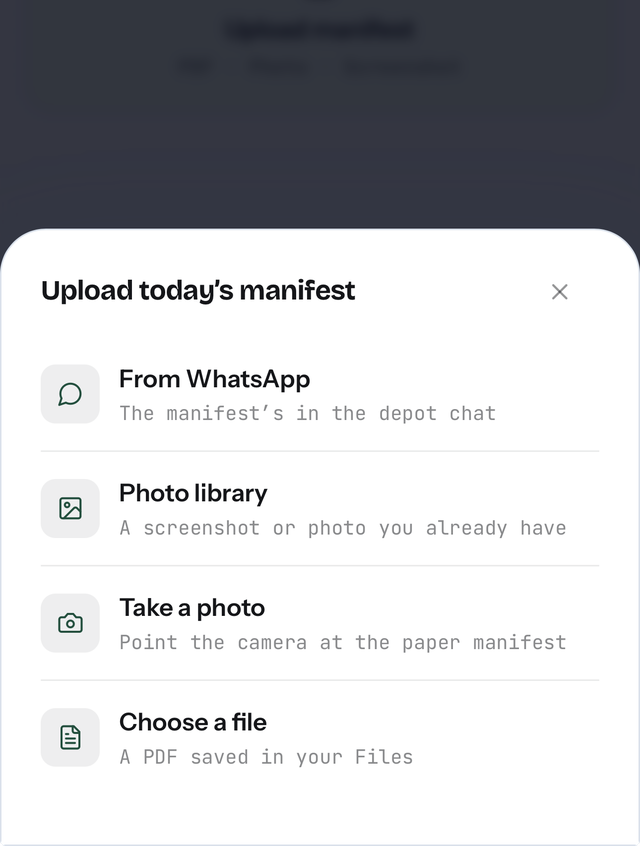
PDF, photo or screenshot. Most depots send it on WhatsApp, and that’s fine: screenshot it straight from the group chat and Owner Driver reads it on your phone. That’s your day started, with the route and expected pay on record.

A manifest screenshot from a depot WhatsApp chat being read into Owner Driver
02
Drive.

Start mileage, finish mileage. Snap receipts as they happen. The app doesn’t need you again until you’re back.

03
Get paid, upload the statement.

Owner Driver matches it to your workdays and lays out every deduction and the VAT. Nothing counts as income until you’ve looked.

04
Accounts, done.

An accountant-ready workbook whenever you want it, and confirmed mileage and expenses sent to QuickBooks, Xero or FreeAgent for you.

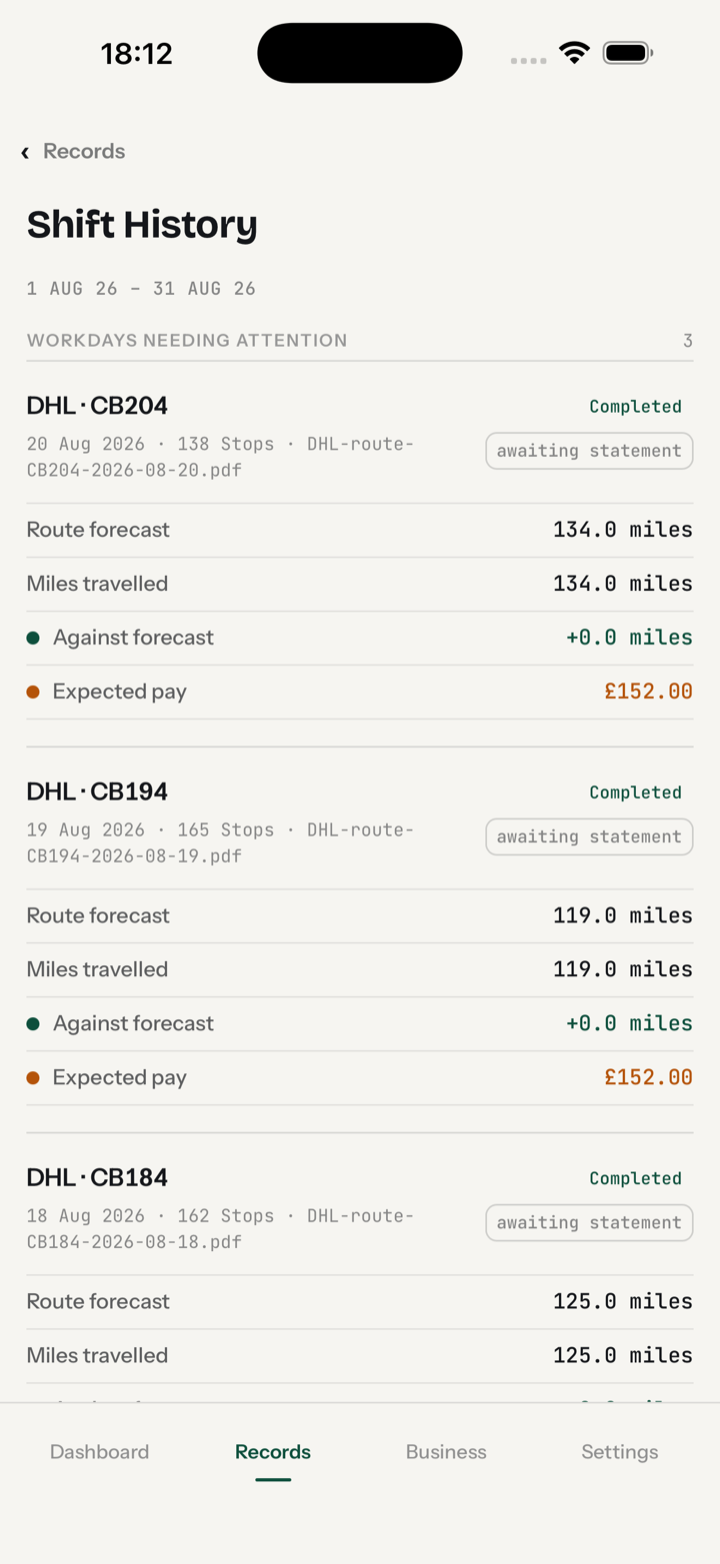
Shift History: each workday with its manifest, route forecast against miles travelled and expected pay
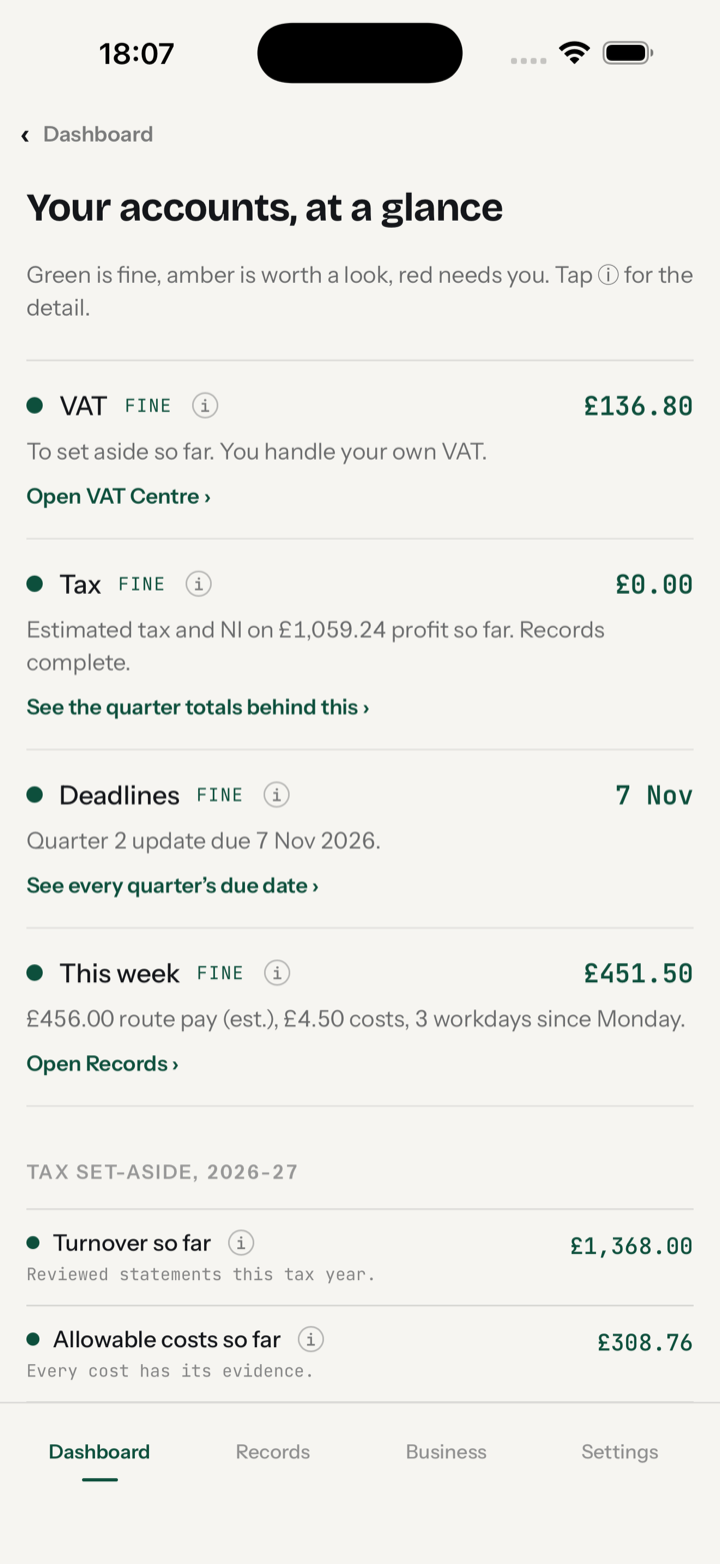
Your accounts, at a glance: VAT, tax, deadlines and this week as traffic lights
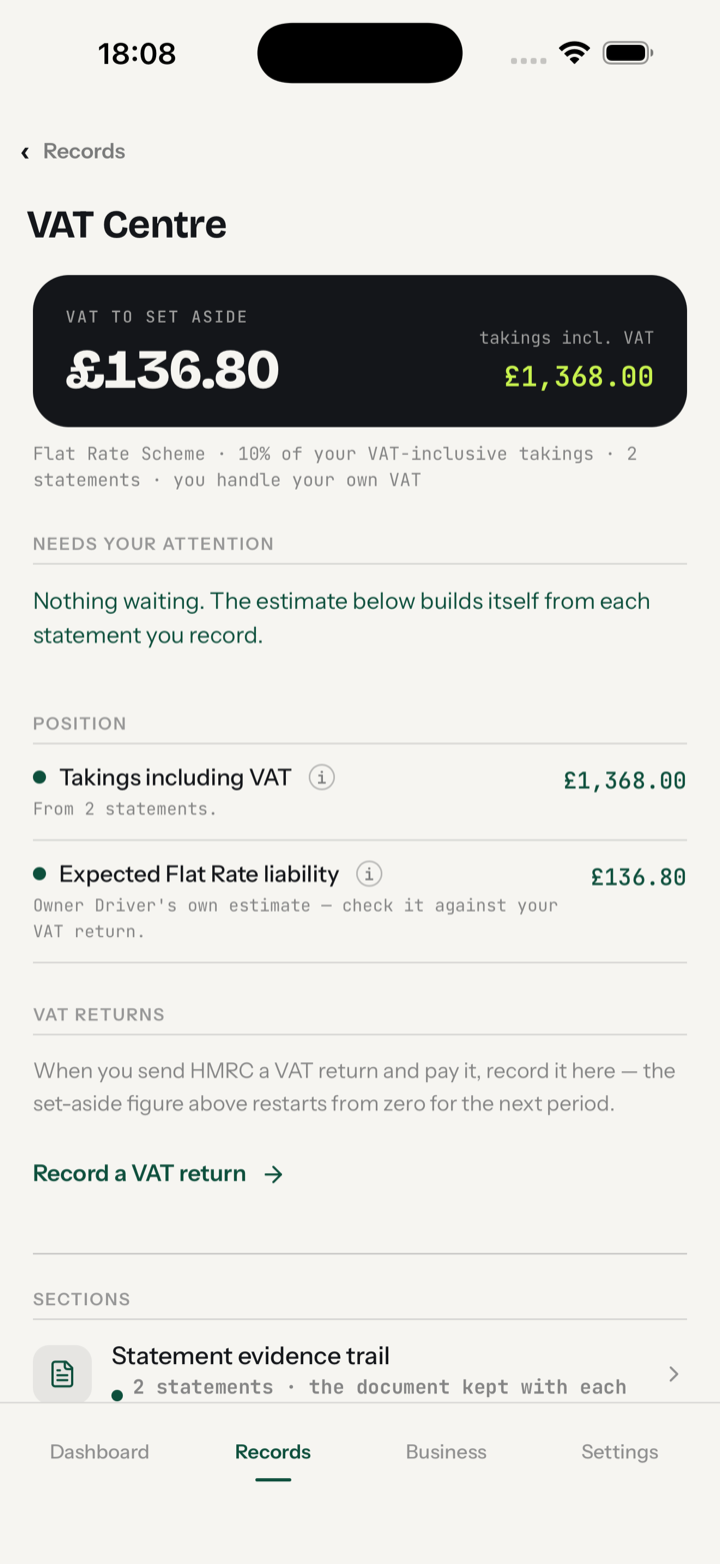
VAT Centre: the amount to set aside, built from your own statements

Built around a courier’s day, not a receipt.

You do two things in Owner Driver: upload, and confirm. The rest happens on its own.

The app reads the manifest into a workday. Your two odometer readings become the day’s confirmed business mileage. A snapped receipt is categorised and stored as evidence. When the statement lands, the app matches it to the days it paid for, lays out the gross, every deduction and the VAT, and puts each deduction in the right tax box for you to approve. You check what it found and tap confirm. That’s the whole job.

And it always shows you where you stand:

Your accounts, at a glance.

Five lights on the Dashboard: VAT, tax, deadlines, VAT pot, this week. They update as your records confirm. Green is fine, amber is worth a look, red needs you.

Tax, estimated as you earn.

Income tax and National Insurance worked out on your profit so far, with a figure to set aside. The January bill stops being a surprise.

A Records hub that runs itself.

Anything needing you becomes a door: a workday awaiting its statement, an overdue payment, a receipt to confirm. Empty means you’re up to date.

VAT, watched properly.

Flat Rate or standard, plus the £90,000 registration watch. If your DSP or accountant holds a VAT pot, you get an independent check on it: the difference is shown, and nothing is concluded for you.

Making Tax Digital, filling itself in.

Each quarter totals itself from your records. Anything still holding it open is listed, with a door straight to fixing it.

Accountant-ready in one tap.

The full workbook: every figure evidenced, categorised and ready for your accountant or accounting software to file from.

Pay for fuel on a fuel card? Sorted.

Fuel cards are where double-counting starts. Snap the pump slip and import the provider’s weekly invoice, and the same diesel lands in your books twice.
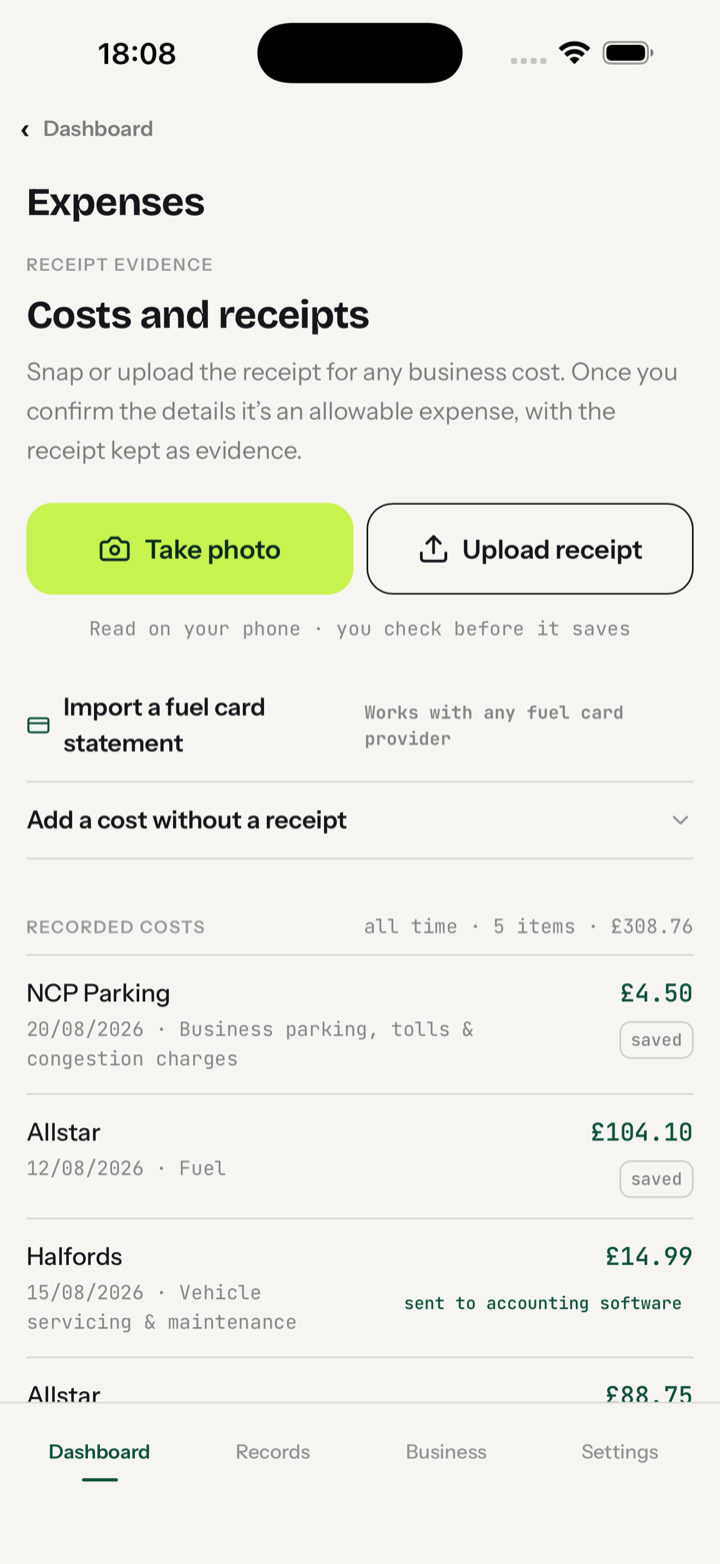
Owner Driver imports the fuel card statement you already download. One expense per weekly invoice, and every invoice is locked once it’s in, so it can never be counted a second time. If you’ve snapped pump slips for the same week, the app tells you.
Attach the provider’s VAT invoice and the VAT side is documented properly too. A pump slip on its own isn’t a VAT receipt, and you need proper evidence from the supplier before any VAT can be reclaimed.
Built and proven on real Allstar statements. Using a different card? Show the app one statement, tell it which columns are which, and it remembers the format for next time.
Costs and receipts: import a fuel card statement, with recorded Allstar fuel costs and a parking receipt

One week. What Owner Driver does with it.

Illustrative figures for a DSP-supplied van on actual costs, Flat Rate VAT at 10%.
Mon–Fri: five manifests uploaded, five days driven5 workday records · 292 business miles confirmed at the odometer
Receipts snapped during the week3 (parking £12.50, phone £35.00, tyre £112.00) · kept as evidence, counted once you confirm. (Parking fees can be claimed. Parking fines never can, and the app knows the difference.)
Statement arrives the following FridayGross £820.00 · deductions: van rental £150.00, fuel card £118.40, insurance £35.00 · net paid £516.60
What Owner Driver doesMatches the statement to the five workdays · records £820.00 gross as turnover (not £516.60) · lays out the three deductions for you to mark allowable, each in its correct SA103F box · keeps the mileage as evidence (no claim, because the van is on actual costs) · sends the confirmed expenses to QuickBooks, Xero or FreeAgent for you
What you’re left withA fully reconciled week. Income matched to workdays, every deduction reviewed, every cost evidenced, already sitting in your accounting software and one tap from an accountant-ready workbook with the audit trail included. Nothing left to type up.
What you see on the DashboardTax: estimate on profit so far · Deadlines: next quarter date · This week: £820 route pay vs £159.50 costs · Records: “Nothing waiting” once the deductions are reviewed
Every number is a line in your records, with the manifest, odometer, receipt or statement behind it.

Ten things that go wrong without it.

01

Net pay recorded as turnover, so the deductions are claimed twice or not at all.

02

Van rental claimed on top of the mileage rate.

03

Statements that never got matched to the days they paid for.

04

A VAT pot “taken care of” by someone else, with no way to check it.

05

Miles estimated at year end, not read off the dash on the day.

06

Receipts in a drawer with no business-use decision recorded.

07

Quarterly MTD totals built from a bank feed that only ever saw the net.

08

Expenses typed into the accounting software and on a spreadsheet.

09

Switching DSP and losing the records that lived in the old company’s system.

10

Discovering all of it in January.

The route is theirs. The records are yours.

Your records live in your own account, not your carrier’s. Change DSP tomorrow and nothing moves. If HMRC ever asks, the evidence is already there, kept for the five years they require.

Nothing sneaks in. You review first. Every statement, every time.
Evidence, not guesswork. Receipts kept as your proof. Miles confirmed against your van’s tax method. VAT never plucked from thin air.
Sent for you. Works with QuickBooks Online, Xero and FreeAgent.

Not caught by the rules yet? Start anyway.

The thresholds come down every year. Over £50,000 is in it now, over £30,000 from April 2027, and over £20,000 planned from April 2028. If you are under them today, you probably won’t be for long.

Start recording now and by the time your turn comes your evidence is already years deep. Nothing to migrate, nothing to catch up on, no scramble the month it applies to you. Owner Driver grows with your business instead of being another job you take on when the deadline lands.

Built by a courier.

Fifteen years driving for the big carriers. Fifteen years of Sunday nights at the kitchen table with a spreadsheet, a shoebox of receipts and a bad mood. I built Owner Driver for me. Now it’s yours.

It’s not another carrier app, it’s not an employer and it’s not a job board. It’s your own record of the work you did, the miles you drove and the money you’re owed. Ready for Making Tax Digital.

Steven Colley, courier, Bridgend
£14.99 a month. The launch price.

Instead of a mileage app, a receipt app, a spreadsheet and an evening with your statements. This is the launch price for couriers who get in early, and when it rises you stay on it. There’s no free trial to remember to cancel: your first recorded shift is already real bookkeeping, so the app earns its keep from day one. Cancel any time in your Apple account.

Owner Driver keeps your records. It doesn’t give tax advice or file with HMRC; that still happens in your accounting software.

Built on the official numbers.

Every rate, threshold and date in Owner Driver comes straight from GOV.UK and HMRC’s own guidance: the 55p and 25p mileage rates, the £90,000 VAT registration threshold, the Flat Rate Scheme rules, the Making Tax Digital quarters and deadlines, the five-year record-keeping rule, the SA103F expense boxes.
When HMRC changes the rules, the app changes with them, so the records you keep today still stand up tomorrow.
Owner Driver is an independent product. It is not affiliated with, or endorsed by, HMRC or any government body.

Straight answers.

Does it replace my carrier’s app?
No. It runs alongside it, quietly collecting the evidence.
Which manifests can it read?
PDF, photo or screenshot. If the depot can send it, the app can read it. Anything it can’t read, you type in.
What actually gets sent to my accounting software?
Only confirmed mileage and receipted expenses, and only after you’ve said yes. Statements never go automatically.
Do I still need an accountant?
That’s your call. Plenty of couriers do their own; Owner Driver builds the records and your accounting software files. Add an accountant if you want one, not because you have to.
Who can see my records?
You. And the accounting software you choose to connect. That’s the list.
Can I take my records with me?
Always. One tap gives you an accountant-ready workbook.
Is it MTD software?
It prepares MTD-ready records. The quarterly update itself is sent by your HMRC-recognised accounting software.
I pay for fuel with a fuel card. How does that work?
Import the provider’s weekly statement and Owner Driver records one expense per invoice, locked so it can never be counted twice against any pump slips you’ve snapped. Attach the weekly VAT invoice and the VAT side is covered too.

You do your work. We’ll prepare your accounts.

Coming to the App Store